Introduction to Graph API Email Integration
Graph API, Microsoft’s unified endpoint for accessing data within the Microsoft ecosystem, has become a cornerstone for modern digital interactions. Among its many functionalities, **email integration** stands out as a powerful mechanism for automating communication, managing user data, and enhancing productivity across platforms. This guide delves into the intricacies of **graph API email integration**, offering actionable insights for developers, IT administrators, and marketers alike.
Understanding Graph API Basics
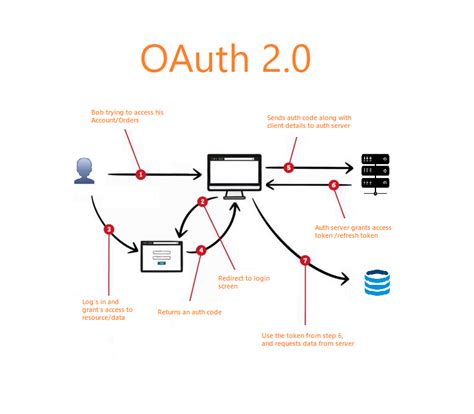
Before diving into email-specific features, it’s essential to understand the fundamentals of Graph API. At its core, Graph API is a RESTful API that provides access to data across Microsoft 365 services, including Outlook, Teams, SharePoint, and more. Developers can use it to read, write, or modify data using HTTP requests, typically via authentication mechanisms like OAuth 2.0.
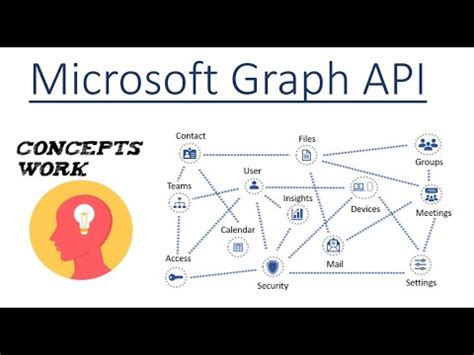
For **email integration**, Graph API enables access to mailbox data such as emails, calendars, contacts, and attachments. This access is governed by permissions, which are assigned via administrative controls or user consent, ensuring compliance with data security standards.

Setting Up Graph API for Email Integration
To leverage **graph API email integration**, the initial setup involves several key steps:
- Register an Azure AD Application: Begin by creating an application registration in the Azure portal. This step assigns a client ID and secret, which are critical for API authentication.
- Configure Permissions: Assign the necessary permissions for accessing mailbox data. Common permissions include **Mail.Read**, **Mail.ReadWrite**, or **Calendars.Read** depending on the use case. These permissions are granted either via user consent or administrative approval.
- Obtain Consent: Users or administrators must grant consent for the application to access mailbox data. This is typically done via a redirect URI configured in Azure AD.
- Generate Access Tokens: Once permissions are set, developers can use OAuth 2.0 to generate access tokens via endpoints like `/token`. These tokens are required for authenticating API requests.
Once the setup is complete, developers can start integrating email functionalities such as retrieving inbox items, sending emails, or managing mailbox folders.
Key Features of Graph API Email Integration
Graph API email integration offers a suite of features tailored to diverse needs:
- Retrieving Emails: Developers can use endpoints like `/me/mailfolders/{folder-id}/messages` to retrieve emails from specific folders. This supports filtering by date, sender, subject, or content.
- Sending Emails: The `/me/sendmail` endpoint allows developers to compose and send emails programmatically, including attachments and formatting options.
- Managing Mailbox Folders: Endpoints like `/me/mailfolders` enable users to create, update, or delete folders dynamically, supporting workflows that require dynamic email organization.
- Attachment Handling: Graph API supports attachments via endpoints like `/me/messages/{message-id}/attachments`, allowing developers to upload, download, or delete files associated with an email.
- Calendar and Contact Integration: Beyond email, Graph API also integrates with calendars and contacts, offering a unified approach to managing user data across platforms.
Advanced Use Cases of Graph API Email Integration
Beyond basic functionalities, **graph API email integration** supports advanced scenarios that add significant value:
- Automated Workflows: Developers can integrate Graph API with Power Automate (formerly Flow) to create automated workflows, such as triggering alerts, logging emails to databases, or syncing data to third-party platforms.
- Custom Dashboards: By pulling data via Graph API, organizations can build custom dashboards or analytics tools that display real-time email metrics, such as inbox activity, spam rates, or user engagement.
- Third-Party Applications: Graph API’s flexibility allows third-party apps to integrate with Microsoft’s ecosystem, enabling features like email archiving, spam filtering, or analytics platforms to leverage mailbox data.
- User Consent Management: For enterprise environments, managing user consent dynamically via APIs or scripts ensures compliance and adaptability, especially in large-scale deployments.
Security Considerations for Graph API Email Integration
Security is a paramount concern when dealing with sensitive data like emails. Here are key considerations for mitigating risks:
- OAuth 2.0 Best Practices: Always use short-lived access tokens with refresh tokens to minimize exposure. Ensure tokens are stored securely, preferably encrypted and isolated from regular code execution.
- Role-Based Access Control (RBAC):strong> Assign permissions based on user roles. For example, restrict **Mail.ReadWrite** permissions to specific administrators or support staff only.
- Audit Logs:** Enable Microsoft 365 audit logs to monitor API activity and detect unauthorized access or anomalies.
- Encryption:** Use encryption for data in transit and at rest, ensuring compliance with regulations like GDPR or HIPAA.
By implementing these security measures, organizations can safeguard sensitive email data while leveraging the full potential of **graph API email integration**.
Best Practices for Graph API Email Integration
Adopting best practices ensures a smoother experience when integrating Graph API for email functionalities:
- Rate Limiting:** Respect API rate limits to avoid throttling. Use exponential backoff strategies when handling large volumes of requests.
- Error Handling:** Implement robust error handling to gracefully manage HTTP status codes like 429 (rate limit exceeded) or 403 (permission denied).
- Documentation:** Keep documentation updated on API usage, permissions, and authentication steps to assist developers or support teams.
- Testing:** Conduct thorough testing in a sandbox environment before deploying to production to identify potential issues.
These practices not only improve reliability but also enhance user experiences and reduce downtime.
Comparative Analysis: Graph API vs. Traditional Email APIs
To understand the value of **graph API email integration**, it’s useful to compare it with traditional email APIs like SMTP or REST APIs from other providers.
| Feature | Graph API | Traditional APIs (e.g., SMTP, REST) |
|---|---|---|
| Unified Access | Access to multiple services (mail, calendar, contacts) via a single endpoint | Separate endpoints for each service |
| Authentication | OAuth 2.0 with centralized permissions | Varies (SMTP: username/password; REST: API keys) |
| Data Scope | Supports rich data (messages, attachments, metadata) | Limited to specific data fields |
| Integration Flexibility | Seamless integration with Microsoft ecosystem | Requires additional middleware for cross-platform integration |
| Scalability | Scales well with enterprise-level deployments | Scalability depends on infrastructure |
From the table, it’s clear that **graph API email integration** offers a more cohesive and scalable solution for organizations already invested in Microsoft’s ecosystem.
Real-World Applications of Graph API Email Integration
To illustrate the practical impact of **graph API email integration**, here are a few real-world applications:
- Customer Support Automation:** Enterprises use Graph API to automate responses to customer emails, route inquiries to appropriate departments, or escalate urgent issues based on predefined rules.
- HR Communication:** HR teams leverage Graph API to send automated onboarding emails, schedule interviews, or update employee records via mailbox integration.
- Marketing Campaigns:** Marketing departments use Graph API to personalize email campaigns, track open rates, or schedule automated follow-ups via integrated mailboxes.
- IT Operations:** IT departments use Graph API to monitor mailbox activity, flag suspicious emails, or automate incident responses.
These applications demonstrate how **graph API email integration** can transform communication workflows across industries.
Tools and Resources for Graph API Email Integration
Several tools and resources can assist developers in implementing **graph API email integration** effectively:
- Microsoft Graph Explorer:** A web-based tool for testing Graph API endpoints and exploring available data without writing code.
- Postman:** An API development tool that supports sending HTTP requests to Graph API endpoints for debugging and prototyping.
- Azure Portal:** A central hub for managing application registrations, permissions, and access tokens.
- Graph API SDKs:** SDKs for popular languages like C#, Python, or JavaScript simplify API integration by providing pre-built libraries and code samples.
These tools streamline the development process and reduce the learning curve associated with **graph API email integration**.
Conclusion
In summary, **graph API email integration** represents a pivotal advancement in modern communication systems. By offering unified access to mail, calendar, and contact data through a single RESTful endpoint, it empowers developers to build smarter, more efficient solutions. Whether you’re an IT administrator, developer, or marketer, understanding the capabilities and best practices of **graph API email integration** is essential for staying competitive in today’s digital landscape.
As Microsoft continues to evolve its ecosystem, leveraging **graph API email integration** will remain a critical strategy for maximizing efficiency and i
ovation. Start exploring today—your next breakthrough in email automation may be just a few API calls away.